
How to Configure Linken Sphere Proxy for Secure Browsing
Users need to maintain their internet access while using distinct identification methods for multiple online accounts. A Linken Sphere proxy maintains separate online sessions that remain active throughout their entire workday. This anti detect browser enables users to create secure work profiles that support their professional activities. The experts use this tool because it can handle difficult network operations. You can operate multiple sessions without facing any breaks in your work.
Why Use a Linken Sphere Proxy for Work
The primary goal of using a Linken Sphere proxy is to maintain connection stability. Users who create multiple accounts at one location should avoid using normal links. You need a dependable system that will direct your HTTP requests through multiple servers. This method prevents servers from linking your profiles together.
Connection Stability and Traffic Routing
Using ISP proxies ensures that your traffic looks like it comes from a home user. The strategy works by using multiple techniques to decrease latency while preventing unexpected speed reductions. The thing that matters most is the quality of your proxy servers. High-quality proxy addresses enable superior data packet routing. Your choice of provider represents an essential decision that requires careful consideration.
| Factor | Benefit |
| Ping Rate | Lower delays for faster interactions. |
| Speed |
Constant throughput for data-heavy tasks. |
| Success Rate | Fewer failed requests to target websites. |
Choosing the Right Linken Sphere Proxy
Different IPs have different performance. You should look for providers like youproxy.io to find stable options. Dedicated addresses provide better performance than shared ones. Another factor that matters is a protocol.
Supported Protocols and Types
Does your current setup support SOCKS5? Linken Sphere supports most modern standards for data transmission. For beginners, knowing what is a proxy is a great way to start. It explains the process when data travels through the internet to reach its destination.
-
HTTP: Provides basic web browsing and simple data retrieval.
-
HTTPS: Secures web traffic through encryption of all transmitted information.
-
SOCKS5: Delivers optimal performance for both UDP and TCP network traffic.
Step-by-Step Setup
The process for configuring your Linken Sphere browser proxy is an easy task. The software provides users with a simple interface that allows them to enter their proxy details. Users have the option to either type their information manually or use the batch import function.
By the way, if you still don’t have Linken Sphere, be sure to use promo code YOUPROXY on your first purchase to save 20%.
Manual Entry
Begin by launching the application and finding the session button. You will see two fields for entering an IP and port information to establish a successful proxy connection.
-
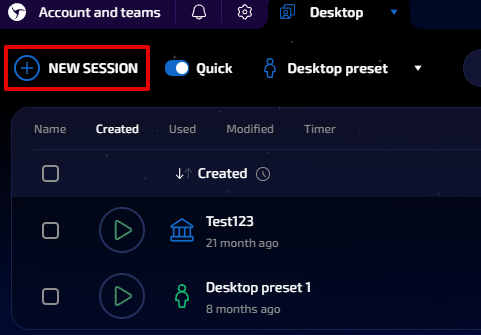
Click on the button to create a new session.
-
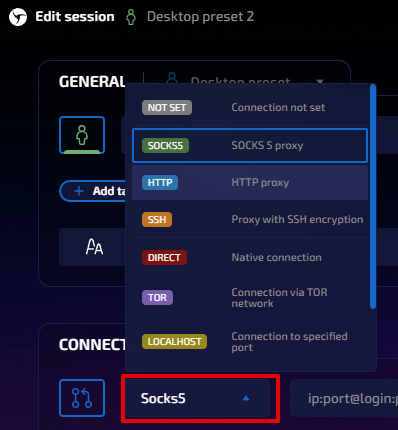
Find the network settings section. The user needs to select the correct proxy type from the dropdown menu.
-
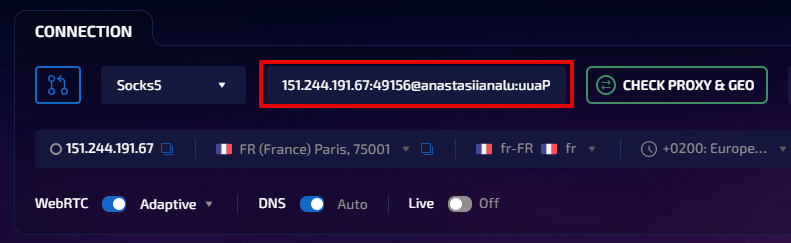
Users must provide both the server address and the specific port number to complete this step. Input the username and password if authentication is required.
Bulk Import for Multiple Work Accounts
What happens when you need to control multiple user profiles all at the same time? The proxy manager allows you to import in a list of IPs. The process minimizes the chances of mistakes through manual work. The format usually involves a list where each line contains a single proxy.
Preparing Your Import List
The list should follow a specific syntax for the software to read it. Most providers deliver lists in the format: IP:Port:Username:Password. The software extracts this information to connect specific IPs with your web browser sessions.
Note: Always double-check your list for typos before importing. A small error can prevent a profile from loading.
Linken Sphere Proxy Features
The built-in tools enable users to handle their resources with high efficiency. You can see which addresses remain connected and which ones have lost connectivity. It's an excellent method to keep your workspace organized.
Tracking Proxy Status
The check proxy feature allows users to verify whether their current IP is live. The tool measures two specific elements, which include response time and the present location of the server. If the check fails, you need to refresh your authentication details.
| Feature | Function |
| Speed Test | Measures the latency |
| Geo-Check | Verifies the physical location of the IP |
| Rotation | Changes the IP address at set intervals |
Fixing Common Network Issues
The first step to resolving connection problems is verifying your password. The port needs to be examined for its accuracy. The smallest tasks, which people consider unimportant, create the biggest challenges. Read the guide on how to set up a proxy SwitchyOmega to learn more about basic browser settings.
The process of maintaining activity requires handling difficulties. The correct settings enable users to achieve profile maintenance. People who work on brief assignments prefer to complete their short tasks with quick sessions. But to manage long-term work, permanent profiles are better.
Pricing Comparison
The costs depend on two main factors, which include the type and the time duration.
-
Mobile services begin at $22.50 per IP while providing increased trust ratings.
-
ISP (static residential) IPs start at a price of $1.27 per IP.
-
The cost of IPv4 access stands at $1.29 per IP.
-
And the price of IPv6 access stands at $0.08 per IP.
Final Steps Before You Start
You must save your current settings before you start browsing. Users can verify system functionality through a test run. The software shows a green status icon to indicate that the connection has reached a stable state.
Technical Specifications for Stability
Keep the list current at all times. The practice of verifying your addresses every week develops into a beneficial routine. Automated checkers provide the solution that professional teams require. Build your project work on the Linken Sphere proxy setup, and you'll gain confidence in scaling your operations.
Visit youproxy.io to discover high-quality proxy solutions that match your requirements.


